
Author: Geoff Cudd, Founder, Deal Prospectors
|
Personal Brand Video for Buyers, Done For You Get a short, professional video that builds trust before outreach, so sellers understand who you are, how you think about ownership, and why engaging with you makes sense. |
You’ve built your list of 400 business owners. You’ve enriched it with emails and phone numbers. Now comes the hard part: actually getting them to respond.
Most searchers fail here. They send generic “I want to buy your business” emails and most likely don’t get any replies.
The problem isn’t that owners don’t want to sell. It’s that your outreach sounds like everyone else’s. Robotic, impersonal, and forgettable.
After doing cold outreach for many years, I’ve learned this:
Multi-channel outreach that feels personal gets 5-10x better response rates than single-channel blasts.
I will show you exactly how to do it, but first, let’s speak about why your current approach may not be working as you expected.
Why Single-Channel Outreach Fails
Scenario 1: Email Only
You send a cold email to an HVAC owner. It goes to his inbox alongside:
- 47 unread emails
- 12 vendor pitches
- 8 customer complaints
- 3 spam messages
Your email gets buried. He never sees it.
Scenario 2: LinkedIn Only
You send a connection request. He gets 5-10 requests per week from salespeople, recruiters, and “business coaches.” Yours blends in. He ignores it.
Scenario 3: Cold Call Only
You call his business line. His receptionist answers, asks what it’s about, and says “He’s busy, can you send an email?”
You send an email. He never sees it. (as per Scenario 1.)
Why Multi-Channel Works
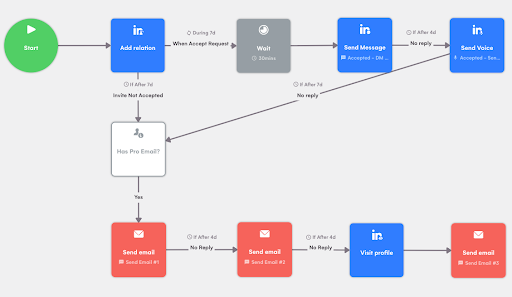
When you combine LinkedIn + Email + Voice Note + Call, something magical happens:
Monday: He gets your LinkedIn connection request. Doesn’t accept it, but he sees your name.
Wednesday: He gets your email. Doesn’t reply, but he recognizes your name from LinkedIn. “Oh, that guy again.”
Friday: He gets a voice note on LinkedIn. Now he’s curious. “Who is this person who keeps showing up?”
Next Tuesday: You call. His receptionist says, “What’s this about?” You say, “He’s expecting my call. I sent him an email and a LinkedIn message last week.” She puts you through.
Result: You’re not a stranger anymore. You’re persistent (but not annoying). You’re real.
Business owners respect persistence. They ignore generic mass outreach.
The Psychology Behind Personal Outreach

Owners can smell automation from a mile away. Here’s what gives it away:
❌ Generic subject lines: “Quick question” or “Opportunity for [Company Name]”
❌ Template language: “I hope this email finds you well”
❌ No specific details: Nothing about their business, location, or industry
❌ Asking for a meeting immediately: “Do you have 15 minutes this week?”
❌ Perfect grammar and formatting: Ironically, too polished = automated
What makes outreach feel personal:
✅ Specific observations: “I saw you’ve been in Fairfax for 18 years”
✅ Local references: “I’m in the area, happy to grab coffee in Tysons”
✅ Conversational tone: Write like you’re texting a friend, not writing a cover letter
✅ One channel references another: “I sent you a LinkedIn request earlier this week”
✅ Imperfect formatting: A casual line break or lack of formal signatures feels human
The Multichannel Outreach Framework
Here’s the outreach system you can use when reaching out to business owners:
Touch 1: LinkedIn Connection Request (Day 1)
- Personalized note (300 characters max)
- Reference something specific about their business
- Don’t pitch yet, just connect
Touch 2: Email (Day 3)
- Reference the LinkedIn request
- Explain why you’re reaching out
- Keep it under 100 words
- No ask yet, just plant the seed
Touch 3: LinkedIn Voice Note (Day 7)
- 30-second audio message
- Mention you emailed + connected on LinkedIn
- Ask if they’d be open to a quick chat
Touch 4: Phone Call (Day 10)
- Call their business line
- Reference all previous touches
- Offer to send more info or schedule a call
Touch 5: Follow-Up Email (Day 14)
- Last touchpoint
- Acknowledge you’ve tried a few times
- Leave the door open
Total timeline: 14 days, 5 touchpoints, 4 different channels
Response rate: 10-15% reply (vs. 2-3% for single-channel email)
Remember: If someone doesn’t reply at all, that doesn’t mean they won’t be interested in selling 6 months down the line. So set up a reminder and do a follow-up.
Channel Breakdown: How to Use Each One
1. LinkedIn Connection Requests
LinkedIn gives you 300 characters for a connection note. Use them wisely.
Bad Example (Generic):
Hi [Name], I’d like to add you to my professional network. Let’s connect!
Why it fails: It could be sent to anyone. No reason to accept.
Good Example (Specific):
Hi Jose, came across New Homes J.L. HVAC while researching businesses in Williamsburg. 20+ years is impressive. Would love to connect and learn about your journey.
Why it works:
- Uses his first name
- References his business by name
- Mentions the neighborhood (Williamsburg, not just “Brooklyn”)
- Compliments longevity (specific: “20+ years”)
- Conversational tone
Another Good Example:
Hi Michael, I’m researching HVAC businesses in Queens and Metro Heating came up. Been following your growth-would love to connect.
Why it works:
- Specific location (Queens)
- Company name (Metro Heating)
- “Following your growth” implies research (even if brief)
Pro Tips for LinkedIn Requests:
✅ Send Monday-Thursday (higher acceptance rates)
✅ Don’t mention “buying” or “acquisition” yet
✅ If they don’t accept in 3 days, move to email
✅ If they accept but don’t message, wait 2 days, then send a DM
2. Email Outreach
Email is your workhorse. It’s where you explain what you want.
Subject Line Rules:
❌ Avoid: “Business Opportunity,” “Quick Question,” “Following Up”
✅ Use: Specific, local, intriguing
Good subject lines:
- “HVAC business in Fairfax”
- “Metro Heating, interested buyer”
- “Williamsburg HVAC – potential exit?”
- “20 years in Queens – impressive”
Why these work: They’re specific, mention the business/location, and make it clear you’re not spam.
Email Template 1: First Outreach (The Soft Open)
Subject: HVAC business in Fairfax
Hi Jose,
I came across New Homes J.L. HVAC while researching HVAC companies in Brooklyn. 20+ years in Williamsburg is impressive, most businesses don’t make it past five.
I’m looking to acquire an HVAC business in NYC and wanted to see if you’d ever consider an exit, or if you know other owners in the area who might be thinking about it.
Happy to grab coffee in Williamsburg if you’re open to chatting.
Best,
Why this works:
✅ Specific: Mentions business name, neighborhood, years in business
✅ Complimentary: Acknowledges longevity without being over-the-top
✅ Low-pressure: “or if you know other owners” gives him an out
✅ Local: Offers to meet in his neighborhood
✅ Short: Around 100 words
Email Best Practices:
✅ Write like you’re texting a friend: Casual, conversational, no corporate jargon
✅ Keep it under 150 words: Owners are busy. Respect their time.
✅ One ask per email: Don’t ask for a call AND a referral AND their financials
✅ Use their first name only: “Hi Jose,” not “Dear Mr. Lopez”
✅ Send between 8-10 AM Tuesday-Thursday: Highest open rates
✅ No attachments on first email: Looks like spam
3. LinkedIn Voice Notes
Voice notes are underrated. They’re personal, hard to ignore, and almost nobody uses them, which makes you stand out.
LinkedIn lets you send 1-minute voice messages to connections. Use them.
When to Use Voice Notes:
- After they accept your connection but don’t respond to your message
- As a follow-up to an unanswered email
- When you want to sound more human than text allows
Voice Note Script 1: The Follow-Up
“Hey Jose, Mike here. I sent you an email last week about potentially acquiring New Homes HVAC, just wanted to follow up and see if that’s something you’d ever consider. I know you’re probably busy, so no worries if the timing isn’t right. But if you’re open to a quick chat, shoot me a message or give me a call at (your number). Thanks, man.”
Length: 25 seconds
Tone: Casual, friendly, not pushy
Voice Note Script 2: The Warm Introduction
“Hey Michael, I know we don’t know each other, but I’ve been researching HVAC businesses in Queens and Metro Heating keeps coming up. I’m looking to buy a business in the area, and I figured I’d reach out directly instead of going through a broker. If you’re ever open to a conversation, even just to explore options – let me know. No pressure. Talk soon.”
Length: 20 seconds
Tone: Genuine, straightforward
Voice Note Best Practices:
✅ Keep it under 30 seconds: Any longer and they won’t listen
✅ Smile while recording: It comes through in your voice
✅ Use their first name: Builds rapport
✅ Reference previous touchpoints: “I sent you an email last week”
✅ End with a clear CTA: “Give me a call” or “Shoot me a message”
✅ Don’t script word-for-word: Sound natural, not robotic
4. Phone Calls
Cold calling business owners is terrifying. But it’s also the highest-conversion channel if done right.
When to call:
- After 2-3 unanswered emails/messages
- Mid-morning (9-11 AM) or mid-afternoon (2-4 PM)
- Tuesday-Thursday (avoid Mondays and Fridays)
Phone Script 1: You Reach the Owner
You: “Hi, is this Jose?”
Owner: “Yeah, who’s this?”
You: “Hey Jose, this is Mike. I sent you an email last week and connected on LinkedIn, I’m looking to buy an HVAC business in Brooklyn, and wanted to see if selling is something you’d ever consider. Do you have two minutes to chat?”
What happens next:
If yes:
“Great. I’ll be quick, I’m actively looking for a profitable HVAC business to acquire, and New Homes HVAC fits what I’m searching for. Have you thought about your exit at all, even if it’s a few years out?”
If no:
“No worries, I know you’re busy. Can I send you a quick email with more info? What’s the best email to reach you?”
Phone Call Best Practices:
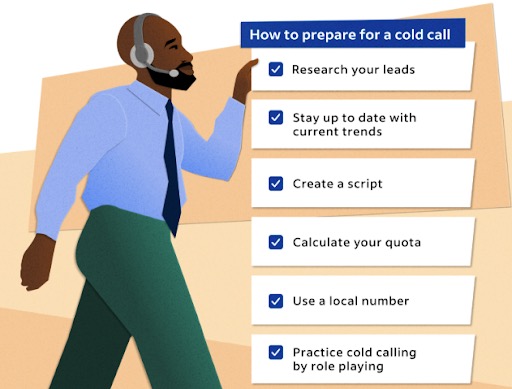
✅ Call from a local number: Use a Google Voice number with the same area code as the business
✅ Sound like a human, not a telemarketer: No script-reading voice
✅ Reference prior touchpoints: “I emailed you last week” builds legitimacy
✅ Ask for 2 minutes, not 15: Lower barrier to entry
✅ If they say no, ask for a referral: “Do you know anyone else who might be interested?”
5. Video Messages (Advanced)
Video messages are the nuclear option, use sparingly, but they work.
Tools: Loom, Vidyard, BombBomb
When to use:
- Owner has ignored 3+ touchpoints
- You want to make a strong impression
- You’re targeting high-value businesses ($5M+ revenue)
Video Message Script:
[Record a 30-45 second video of yourself]
“Hey Jose, Mike here. I’ve reached out a couple of times about potentially buying New Homes HVAC, and I figured I’d try something different, a quick video. I know you’re busy, so I’ll keep this short. I’m actively looking to acquire an HVAC business in Brooklyn, and yours fits exactly what I’m searching for. If selling is something you’ve ever thought about, I’d love to have a conversation. No pressure, no brokers, just a chat. Shoot me an email or give me a call. Thanks, man.”
Send via:
- Email (embed Loom link)
- LinkedIn DM
- Text message (if you have their cell)
Why video works:
✅ Impossible to ignore: Way more engaging than text
✅ Shows you’re real: Face + voice = trust
✅ Demonstrates effort: You took time to record a video just for them
Warning: Don’t overuse. Save for high-priority targets.
|
Personal Brand Video for Buyers, Done For You Get a short, professional video that builds trust before outreach, so sellers understand who you are, how you think about ownership, and why engaging with you makes sense. |
Mixing Channels: The Sequence Matrix
Here’s how to vary your approach based on the owner’s response (or lack thereof):
| Touch | Day | Channel | Action |
| 1 | Day 1 | Send a connection request with a note | |
| 2 | Day 1 | Send initial email (reference LinkedIn) | |
| 3 | Day 7 | Email or Voice Note | Follow-up email or LinkedIn voice note |
| 4 | Day 10 | Phone | Call the business line, leave a message |
| 5 | Day 14 | Final follow-up (“last email”) | |
| 6 | Day 30 | Check if they accepted the request, send DM |
After Day 30: Move to “long-term nurture” list. Follow up every 3 months with light touches (e.g., “Checking in, still looking for HVAC businesses in Brooklyn”).
When to Follow Up (And When to Stop)
Green Light: Keep Following Up
✅ They opened your email but didn’t respond
✅ They accepted your LinkedIn request but didn’t message
✅ Receptionist said “He’s busy, send an email”
✅ Voicemail is active (means they check messages)
Action: Continue sequence through Day 14, then move to quarterly check-ins.
Yellow Light: Soft Follow-Up
⚠️ They replied “Not interested right now”
⚠️ They asked for more info but haven’t responded since
Action: Reply with “No problem, can I check back in 6 months?” Then add to the nurture list.
Red Light: Stop
❌ They replied “Not interested, don’t contact me again”
❌ Email bounced (bad address)
❌ Phone number disconnected
Action: Remove from list. Ask for referrals if they were polite.
Now, you will have a lot of activity, and you may lose track because of the volume. That’s why you need:
CRM to Track Everything
Airtable (Free)
- Build a custom CRM
- Track which owners you’ve contacted, when, and via which channel
HubSpot (Free tier available)
- Tracks email opens, LinkedIn activity, calls
- Overkill for most searchers but powerful
Google Sheets (Free)
- Simple tracking:
- Column A: Business Name
- Column B: Owner Name
- Column C: Email
- Column D: LinkedIn
- Column E: Phone
- Column F: Status (Not Contacted / Emailed / Replied / Meeting)
- Column G: Last Touch Date
- Column H: Next Action
Final Thoughts
Multichannel outreach isn’t about spamming people on different channels.
It’s about showing up consistently, across multiple platforms, in a way that feels personal and genuine.
Owners are busy. They miss emails. They ignore LinkedIn. They don’t answer their phones.
But when you combine LinkedIn + Email + Voice Notes + Calls, you become impossible to ignore.
The key is to make every touchpoint feel like it was written just for them, because it was.
Now go build your sequence and start reaching out.
One reply can change everything.