
Author: Geoff Cudd, Founder, Deal Prospectors
Target List Creation, Done For YouLet Deal Prospectors do the heavy lifting for you. We manually build a targeted list of real business owners that match your buy box so you can start outreach immediately. |
Most searchers waste weeks manually hunting for business owners.
They Google “HVAC companies near me,” click through websites one by one, and end up with 30 contacts after hours of work.
There’s a better & faster way.
LinkedIn Sales Navigator lets you build a list of 400+ qualified business owners in under 20 minutes.
Not prospects. Not “decision makers.” Actual owners with their contact information, ready for outreach.
We’ve used this exact process to source deals in HVAC, plumbing, electrical, landscaping, etc.
It works for any industry where owners are on LinkedIn, which is pretty much everything except the smallest mom-and-pop shops.
Here’s the step-by-step blueprint.
Why Sales Navigator (Not Regular LinkedIn)
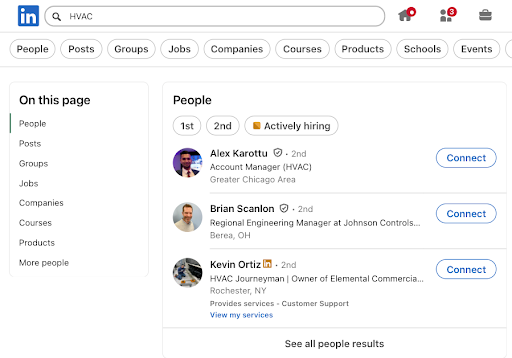
Regular LinkedIn search is limited:
- 3rd-degree connections only
- Can’t filter by company headcount or years at the company
- Can’t save lead lists
- Can’t export contact data
- Search results cap at ~1,000
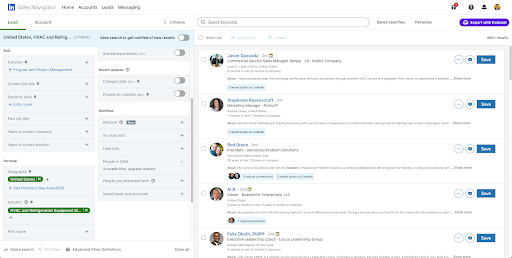
Sales Navigator gives you:
- Access to 900M+ profiles (not just your network)
- Advanced filters (company size, seniority, years at company, geography)
- Saved searches that auto-update
- InMail credits for direct outreach
- Lead lists you can organize and export
- Boolean search for laser-targeting
Cost: $79.99/month (annual plan) or $99.99 month-to-month
If you’re serious about buying a business, this is the single best $80/month you’ll spend.
The 20-Minute Process
Step 1: Choose Your Target Profile (2 minutes)
Before you touch Sales Navigator, get clear on who you’re looking for.
Example Target:
- Industry: HVAC businesses
- Geography: Northern Virginia (Fairfax, Loudoun, Arlington counties)
- Size: 10-50 employees (big enough to be profitable, small enough to be owner-operated)
- Owner tenure: 10+ years (proven business, owner likely thinking about exit)
- Revenue estimate: $2M-$10M (implies $500K+ profit at 25-50% margins)
Write this down. You’ll use it to build your filters.
Step 2: Open Sales Navigator Lead Search (1 minute)
Log into Sales Navigator: linkedin.com/sales
Click “Lead Search” (not Account Search, we want people, not companies)
You’ll see a blank search page with filters on the left sidebar.
Step 3: Set Your Core Filters (5 minutes)
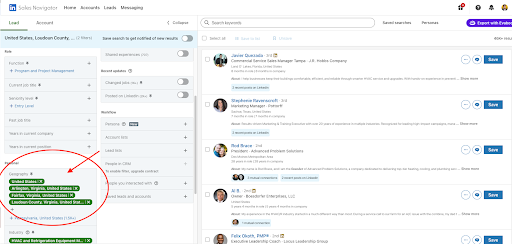
This is where the magic happens. Here are the filters I use for every search:
Geography
Click “Geography” → “Add location”
For Northern Virginia, I add:
- Arlington, Virginia, United States
- Fairfax, Virginia, United States
- Loudoun County, Virginia, United States
Sales Navigator lets you search by city, county, or metro area. Use counties if you want broader coverage.
Pro tip: You can add multiple locations. If you’re targeting the entire DC metro area, add Arlington, Fairfax, Loudoun, Prince William, Alexandria, etc.
Job Title
Click “Job Title” → Type: Owner
Sales Navigator will auto-suggest titles. Select:
- Owner
- Business Owner
- CEO
- President
- Founder
- Managing Partner
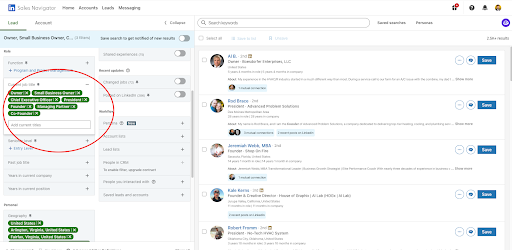
Important: Don’t just type “Owner” and move on. LinkedIn job titles are messy. Someone might list themselves as “CEO & Founder” but not “Owner.” Cast a wide net here.
Boolean trick: In the keyword field (we’ll get to this), you can also search:
(“business owner” OR “owner” OR “CEO” OR “president” OR “founder”)
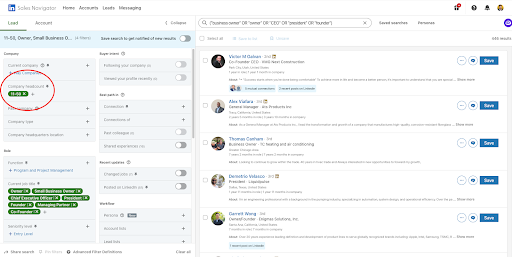
Company Headcount
Click “Company Headcount” → Select ranges
For profitable service businesses, I use:
- 11-50 employees
- 51-200 employees (if I want slightly larger businesses)
Why these ranges?
- 1-10 employees: Often too small to have $500K+ profit
- 11-50 employees: Sweet spot—established, profitable, still owner-operated
- 51-200: Bigger businesses, higher profit, but may have professional management (owner less involved)
Start with 11-50. You can always expand later.
Years at Current Company
Click “Years at Current Company” → Select: 10+
This filters for owners who’ve been running the business for at least a decade. Why does this matter?
- Longevity = Proven business. They didn’t go under in year 3.
- Exit timing. After 10-15 years, many owners start thinking about their next chapter.
- Credibility. Someone who’s been CEO for 12 years is actually running the company, not a hired executive.
Industry
Click “Industry” → Type your target industry
For HVAC, I select:
- HVAC (Heating, Ventilation and Air Conditioning)
- Construction
- Facilities Services
For plumbing:
- Plumbing
- Construction
- Building Materials
LinkedIn’s industry tags are inconsistent. A plumbing company might be tagged as “Construction” or “Consumer Services.” Add multiple related industries to catch everyone.
Seniority Level
Click “Seniority Level” → Select:
- Owner
- Partner
- CXO (C-level executives)
This filters out employees and focuses on decision-makers.
Step 4: Add Boolean Keywords for Precision (3 minutes)
At the top of the search page, you’ll see a keyword search bar. This is where you can get surgical.

Example Boolean search for HVAC owners in Northern Virginia:
(“HVAC” OR “heating” OR “cooling” OR “air conditioning”) AND (“owner” OR “CEO” OR “president” OR “founder”)
What this does:
- Ensures the person’s profile mentions HVAC-related keywords
- Double-checks they have an owner-level title (even if LinkedIn’s filters miss it)
Another example for plumbing:
(“plumbing” OR “plumber” OR “pipefitting”) AND (“owner” OR “founder” OR “CEO”)
Pro tip: If you’re getting too many results, add exclusions:
(“HVAC”) AND (“owner”) NOT (“software” OR “sales” OR “marketing”)
This filters out HVAC software salespeople or marketing consultants who work with HVAC companies but don’t own them.
Step 5: Review Your Results (2 minutes)
Hit Search.
Sales Navigator will show you results, hopefully 300-500+ leads.
What you should see:
- Profile photos
- Names
- Job titles (Owner, CEO, President)
- Company names
- Location
- How long they’ve been at the company
Scan the first 10-20 results. Do they look like actual business owners? Or are you seeing:
- Corporate executives at huge companies (e.g., “President at Johnson Controls”)
- Consultants or coaches
- People with no company listed
If you’re getting junk, tighten your filters:
- Add more specific keywords
- Reduce company headcount (e.g., only 11-50 employees)
- Exclude industries (e.g., NOT “Software”)
Step 6: Save Your Search (1 minute)
Once you’re happy with the results, click “Save Search” at the top right.
Name it something you’ll remember:
- “NOVA HVAC Owners 10+ yrs”
- “Northern VA Plumbing Owners”
- “DC Metro Electrical 11-50 emp”
Sales Navigator will save this search and update it automatically as new people match your criteria. Every week, check back to see new leads.
Step 7: Save Leads to a List (3 minutes)
Now you need to export these leads so you can contact them.
Option A: Manual Save (Free)
Go through the results and click “Save” on each profile you want.
Sales Navigator lets you save up to 1,500 leads per account. You can organize them into lists:
- “NOVA HVAC – Priority”
- “NOVA Plumbing – Follow Up”
- “Northern VA Electrical – Cold Outreach”
Option B: Bulk Save (Faster)
Use a Chrome extension like Phantombuster or Dux-Soup to auto-save leads from your search results.
Phantombuster workflow:
- Install Phantombuster
- Connect your LinkedIn account
- Input your Sales Navigator search URL
- Run the “LinkedIn Search Export” automation
- It’ll save 100-500 leads in minutes
Cost: Phantombuster starts at $59/month for 20,000 actions/month (enough for 500+ leads).
Warning: LinkedIn doesn’t love automation. Keep it under 100 saves/day to avoid getting flagged.
Step 8: Export to CSV (3 minutes)
Sales Navigator doesn’t have a native export button (annoying, I know). You need a tool.
Best options:
1. Phantombuster (Recommended)
- Exports: Name, Job Title, Company, LinkedIn URL, Location
- Cost: $59/month
- Setup: 10 minutes
- Limits: Can export 500+ leads per search
2. LinkedIn Helper
- Chrome extension
- Exports: Name, Title, Company, LinkedIn URL
- Cost: $15/month
- Limits: 800 profiles per day
3. Dux-Soup
- Chrome extension
- Exports: Name, Title, Company, LinkedIn URL, Email (if available)
- Cost: $14.99/month (Pro version)
- Limits: 400 actions/day
My recommendation: Use Phantombuster if you’re doing this at scale (500+ leads per week). Use Dux-Soup if you’re just starting out (200-300 leads per month).
Example CSV output:
| First Name | Last Name | Job Title | Company | LinkedIn URL | Location |
| Jose | Lopez | Owner & President | New Homes J.L. HVAC Inc | linkedin.com/in/joselopez-hvac | Brooklyn, NY |
| Michael | Russo | Owner & Founder | Metro Heating & Cooling | linkedin.com/in/michael-russo-hvac | Queens, NY |
| David | Kim | CEO & Owner | Brooklyn Comfort Systems | linkedin.com/in/davidkim-comfort | Brooklyn, NY |
Now you have a spreadsheet with 400 business owners and you can reach out to them on LinkedIn. But if you want to find their phone numbers or emails, you’re missing one critical thing: contact information.
That’s when DATA ENRICHMENT comes into play.
Enriching Your List with Contact Info (Bonus Step)
LinkedIn profiles don’t always show email addresses or phone numbers. You need to enrich your data.
Option 1: Upload to Apollo.io
- Export your Sales Navigator list to CSV
- Upload to Apollo.io
- Apollo matches LinkedIn URLs to their database
- It appends: Email, Phone, Company Revenue, Employee Count
- Export enriched CSV
Cost: Apollo Professional is $79/month (includes email verification)
Match rate: 40-60% of LinkedIn profiles will have verified emails in Apollo

Option 2: Use Clay for Waterfall Enrichment
Clay is more powerful than Apollo because it tries multiple data sources in sequence.
Clay workflow:
- Upload your Sales Navigator CSV
- Add enrichment: “Find email” (tries Hunter.io, then Apollo, then Snov.io)
- Add enrichment: “Verify email” (checks if it’s valid)
- Export CSV with verified emails
Cost: Clay Starter is $149/month (10,000 credits)
Match rate: 50-70% with waterfall enrichment
Option 3: Manual Lookup (Slow but Free)
If you’re on a budget:
- Visit each company website
- Look for “Contact” or “About” page
- Find owner email (often firstname@companyname.com)
- Manually add to spreadsheet
This works but it’s slow, expect 10-15 minutes per lead.
Not viable for 400 leads.
The Final List: What You’ll Have
After 20 minutes in Sales Navigator + 10 minutes enriching:
- 400 business owners in your target industry and geography
- LinkedIn profiles (for social selling and InMail)
- 200-300 verified emails (50-70% match rate with enrichment)
- Company details (name, size, location)
That’s 200-300 qualified leads ready for cold email or InMail outreach.
Time invested: 30 minutes
Cost: $80 (Sales Navigator) + $79 (Apollo) or $149 (Clay) = ~$160-230/month
ROI: One deal pays for 5+ years of tools.
🔥Advanced Filters to Refine Your Search🔥
Once you’ve mastered the basics, use these advanced filters to get even more targeted:
1. Company Headcount Growth
Filter: “Company Headcount Growth” → Negative growth
This shows businesses that are shrinking. Potential signals:
- Owner is winding down (preparing to sell)
- Business is struggling (distressed seller)
Use with caution, verify why headcount is dropping before assuming it’s a good opportunity.
2. Posted Content on LinkedIn in the Past 30 Days
Filter: “Posted on LinkedIn” → Past 30 days
This finds active owners who are engaged on LinkedIn. Why does this matter?
- They’re more likely to see your InMail or connection request
- They’re comfortable with LinkedIn outreach
- They’re not ghosts—they’re reachable
3. Groups
Filter: “Groups” → Type: Small Business Owners
This finds owners who are in LinkedIn groups related to business ownership. These are people who are thinking about strategy, exit planning, and growth, exactly who you want.
4. School
Filter: “School” → Type local universities
If you’re targeting a specific region (e.g., Northern Virginia), search for owners who went to local schools:
- George Mason University
- Virginia Tech
- University of Virginia
Why? Local alumni often stay in the area and build businesses there. It’s also a conversation starter for outreach.
5. Seniority + Company Size Combo
Combine:
- Seniority: Owner/Partner
- Company Size: 11-50 employees
- Industry: HVAC
- Years at Company: 10+
This is a great combination filter, not too big (corporate), not too small (unprofitable), just right.
❌Common Mistakes (And How to Avoid Them)❌
Mistake 1: Searching for Companies Instead of People
Sales Navigator has two search modes:
- Lead Search (people)
- Account Search (companies)
You want Lead Search. Searching for companies gives you business pages, not owner profiles.
Mistake 2: Being Too Broad
If you search for “Owner” with no other filters, you’ll get 10 million results, including CEOs of Fortune 500 companies and 19-year-old Etsy shop owners.
Always use at least 3-4 filters:
- Geography
- Company headcount
- Industry
- Years at company
Mistake 3: Ignoring “Years at Current Company”
Without this filter, you’ll get:
- Newly hired CEOs (not owners)
- People who just bought the business last year (not ready to sell yet)
- Executives rotating through companies
Filter for 10+ years to find committed, long-term owners.
Mistake 4: Not Saving Your Searches
If you don’t save your search, you’ll have to rebuild it from scratch next time.
Save every search and let Sales Navigator auto-update it weekly with new leads.
Mistake 5: Not Enriching Contact Data
Having a list of 400 LinkedIn profiles is useless if you can’t email them or give them a call. Always enrich with Apollo or Clay to get verified emails.
What to Do with Your 400-Owner List
Now you have the list. Here’s how to use it:
1. Cold Email Outreach
Send personalized emails using the template from earlier in this guide:
Subject: HVAC business in Fairfax
Hi [Owner Name],
I came across [Company Name] while researching HVAC companies in Northern Virginia. [X] years in business is impressive, most don’t make it past five.
I’m looking to acquire an HVAC business in the area and wanted to see if you’d ever consider an exit, or if you know other owners who might be thinking about it.
Happy to grab coffee in [City] if you’re open to chatting.
Best,
[Your Name]
2. LinkedIn InMail
If you have InMail credits (Sales Navigator gives you 50/month), send direct messages:
Subject: Northern VA HVAC acquisition
Hi [Owner Name],
I’m actively looking to acquire an HVAC business in Northern Virginia and came across [Company Name]. Are you ever open to conversations about a potential exit?
I’d love to connect and learn more about what you’ve built.
Best,
[Your Name]
3. Connection Requests with Notes
Send LinkedIn connection requests with a personalized note:
Hi [Owner Name], I’m researching HVAC businesses in Northern VA and came across [Company Name]. Would love to connect and learn more about your journey. Thanks!
Once they accept, follow up with a message about acquisition interest.
4. Segment Your List
Not all 400 owners are equal.
Segment them:
Tier 1 (Hot Leads):
- 15+ years at company
- Active on LinkedIn (posted in past 30 days)
- Company headcount 20-50 employees
Tier 2 (Warm Leads):
- 10-15 years at company
- Company headcount 11-20 employees
- Not active on LinkedIn
Tier 3 (Cold Leads):
- 10 years at company
- Company headcount under 10 employees
- May not be profitable enough
Start outreach with Tier 1. If you exhaust that, move to Tier 2.
Scaling This Process
Once you’ve done this for one industry/geography, repeat it:
Week 1: HVAC in Northern Virginia (400 leads)
Week 2: Plumbing in Northern Virginia (350 leads)
Week 3: Electrical in Northern Virginia (300 leads)
Week 4: HVAC in Maryland (500 leads)
After 4 weeks: 1,550 total leads
Send 50 emails per week = 31 weeks of outreach from one month of sourcing.
Tools Stack Summary
| Tool | Purpose | Cost | Required? |
| Sales Navigator | Find business owners | $79.99/mo | Yes |
| Phantombuster | Export LinkedIn leads | $59/mo | Optional (can do manually) |
| Apollo.io | Email enrichment | $79/mo | Yes (or use Clay) |
| Clay | Advanced enrichment | $149/mo | Optional (better match rates) |
| Email verification | Verify emails before sending | $0.008/email | Yes (use NeverBounce) |
Minimum stack: Sales Navigator + Apollo = $160/month
Optimal stack: Sales Navigator + Phantombuster + Clay = $290/month
Target List Creation, Done For YouLet Deal Prospectors do the heavy lifting for you. We manually build a targeted list of real business owners that match your buy box so you can start outreach immediately. |
✍️Final Thoughts✍️
Building a 400-owner list in 20 minutes isn’t magic, it’s just knowing which buttons to click.
Sales Navigator is the most underrated tool for searchers.
Most people use it for B2B sales, but it’s perfect for finding business owners.
The key is specificity:
- Don’t search for “business owners” (too broad)
- Search for “HVAC owners in Fairfax County with 11-50 employees who’ve been there 10+ years” (just right)
Once you’ve built your first list, the process becomes muscle memory.
You can crank out 400-500 qualified leads in under 30 minutes, week after week.
Now go build your list.